


Co-parenting: Shared Parenting
4.126.00 Reviews
App Specs
- Version
- 1.105.3
- Updated On
- License
- Free
- Downloads
- 10,000+
- Developer
- Happy Parents AB
- Categories
- Communication
- Platform
- Android
Screenshots




 Analysis by AppCompare
When two households are trying to coordinate a child’s week, even small details can turn into a string of messages: a school pickup, a change of clothes, a shared cost, or a reminder about who has the next appointment. I’m interested in co-parenting apps when they make those practical conversations easier to keep track of, not when they promise to fix a difficult relationship. Co-parenting is a communication app from Happy Parents AB, and its focus is the everyday organization that can otherwise get scattered across chats, calendars, and notes.
One place for the details that cross between homes
The app makes most sense when both caregivers need a common place to refer back to. Picture a weekday when one parent is arranging pickup and the other has paid for something the child needs. A shared calendar and expense records can give those details a home beyond a passing text. That is useful not because an app can prevent every misunderstanding, but because both adults have a clearer place to check what was planned and what was paid.
I’d treat it as a practical workspace for child-related coordination rather than a general family social app. The people who are most likely to benefit are co-parents who already communicate but want fewer loose ends: families moving between two homes, parents dividing routine costs, or adults who prefer to keep logistics separate from personal conversations. If the other caregiver will not use a shared tool, or if the arrangement only involves occasional messages, a normal calendar and a simple chat may be enough.
Setting boundaries before sharing a household tool
Before moving conversations or records into any shared app, I’d agree on what belongs there. For example, you might use it for pickup changes, school-related dates, and child expenses, while keeping unrelated personal discussion elsewhere. That small boundary makes a shared space more predictable and can reduce the temptation to treat every notification as an invitation to reopen an argument.
There is also a household-device question. If a phone or tablet is used by more than one person, I would avoid leaving sensitive conversations open for casual browsing and would be careful about which account is signed in. The app is intended for co-parenting, not as a child-facing activity, so adults should decide who uses it and what information they are comfortable placing in a shared space. A shared calendar entry is not automatically suitable for every family member to see.
Getting Started: Why Co-Parenting?
First things first, why would you even need a co-parenting app? Well, if you're like many families today, coordinating schedules, managing expenses, and maintaining clear communication can be a bit of a juggling act. That's where the Co-parenting app steps in, aiming to streamline all these tasks into one neat package.
User Interface: Ease of Use
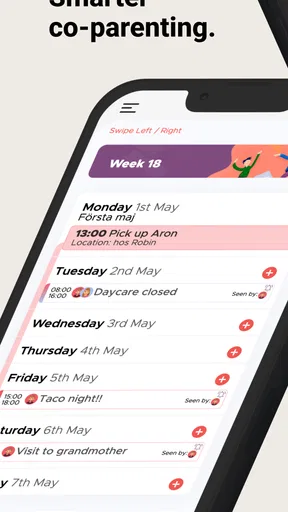
Upon launching the app, the first thing you'll notice is its clean and intuitive interface. Everything is laid out logically, making it easy to navigate. Even if you’re not particularly tech-savvy, you’ll find yourself getting the hang of it quickly. It's like the app took a course in simplicity and passed with flying colors.
Worth Reading Before You Choose

Switching to Android Auto Means Rethinking Your Driving Routine

Google Calendar Makes a Crowded Week Easier to Manage

Baby Panda World Brings Quick Play to Modern Phones, but Its Game Library Feels Busy

ESPN’s Live Game View Makes Following Close Games Easier

QuizzLand Review: A Good Fit for Short Trivia Breaks, Not Every Player

Basketball Stars: Multiplayer Is Fast, but Can It Recover When Matches Go Wrong?
For a first shared setup, I’d keep the initial routine deliberately small. Add only the dates and recurring arrangements that both adults need to see, then use it for a short stretch before trying to move every family detail into one place. This is a useful way to learn whether the app suits your communication habits without making setup feel like another project. It also gives both parents a chance to agree on how they will record a change, rather than assuming they mean the same thing by “updated.”
Features that Stand Out
Let’s talk about some of the key features that make this app a standout in the co-parenting arena:
- Shared Calendar: This feature is a lifesaver. You can sync up both parents' schedules, add events, and set reminders. No more "I thought it was your weekend!" mix-ups.
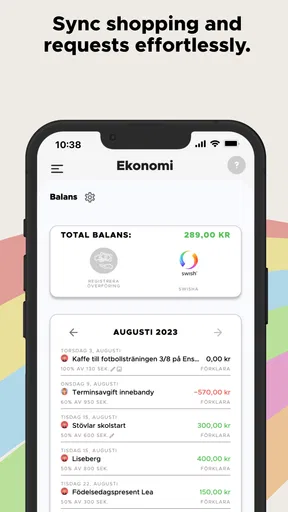
- Expense Tracking: Keeping track of who paid for what can be awkward. The app allows you to log expenses and even upload receipts. It’s like having a financial mediator in your pocket.
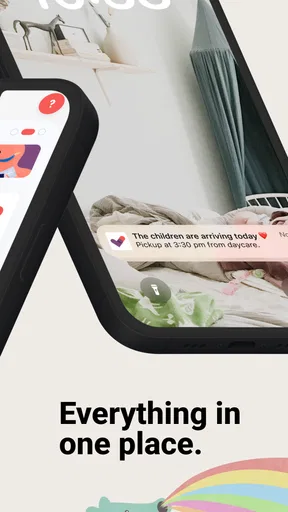
- Secure Messaging: The app includes a built-in messaging system, which is great for keeping all your co-parenting conversations in one place. It’s secure, too, so you don’t have to worry about prying eyes.
The useful trick with these tools is to give each one a narrow job. I would put firm dates and handover-related plans on the calendar, use expense entries for costs that need a record, and keep messages for questions that need an answer. That separation makes later checking easier: a schedule change does not have to be reconstructed from a long chat, and a receipt is less likely to disappear among unrelated messages.
For expenses, a simple shared habit matters more than elaborate bookkeeping. Agree on what counts as a shared child-related cost and enter it close to when it happens, while the amount and receipt are easy to verify. If one person logs everything much later, the record may be less helpful and could become a new point of disagreement. The app can organize information; the parents still need to agree on how to interpret it.
Performance and Reliability
In terms of performance, the app runs smoothly with no noticeable lag. It’s available on both Android and iOS, so no one’s left out. The updates come regularly, ensuring bugs are fixed promptly and new features are added thoughtfully.
Its current version is 1.80.3, and the minimum operating-system requirement is version 9. Before choosing it as the one shared place for important plans, I’d check that both adults’ phones can run it and that each person is willing to keep it available. Having one parent rely on the app while the other continues to use a different calendar creates two sources of truth, which defeats much of the point. For urgent changes, I would still use the contact method both parents already know to check.
Compared with the usual alternatives—text threads, separate personal calendars, or a shared general-purpose calendar—this app is more specifically organized around co-parenting tasks. That focus can be worthwhile when scheduling, costs, and child-related messages all need to stay together. The trade-off is that a dedicated tool only helps if both people adopt the same routine. A regular calendar may be simpler for a family that only needs to share dates, while a chat app may be more convenient when discussion is the main need and records are not.
Privacy and Security
Privacy is a big deal when it comes to apps like this, especially when you’re dealing with sensitive family information. The Co-parenting app takes this seriously, offering encrypted messaging and secure data storage. You can sleep easy knowing your info is locked down tight.
Even when using a dedicated app, I would share only information that helps with the child’s care and coordination. Keep account access with the adults who need it, think carefully before using a shared device, and avoid assuming that a message or calendar entry is private from everyone who can unlock that device. These are useful habits for any family organizer, particularly when a household has changing visitors, older children borrowing phones, or devices that stay signed in.
One practical boundary to settle early is how to handle a correction. If a time or expense is entered incorrectly, agree that the person who notices it will flag the issue clearly rather than quietly relying on a later edit to communicate the change. That does not require a complicated process; it simply prevents a record from being mistaken for a conversation both people have seen and understood.
Community and Support
If you ever run into issues, the app features a robust support system. There’s a comprehensive FAQ section and a responsive customer service team. Plus, the app fosters a sense of community among users, allowing you to connect and share tips with other co-parents.
For a new user deciding whether to try it, the basic practical questions are whether the other parent is willing to participate, whether both phones meet the system requirement, and whether the family actually needs more than an ordinary shared calendar. The app is free to download, with in-app purchases ranging from $7.49 to $9.49 per item. I’d look at the available purchase details before committing to a paid option and decide together whether any paid addition solves a real problem in your routine. The free starting point makes it easier to assess the fit, but I would not assume every feature or use case has the same cost.
It has a 4.2 average from around 70 ratings, and it has been installed over 10,000 times. Those figures suggest that other people are using it, but they cannot tell me whether its approach will work for a particular co-parenting relationship. I’d judge it by a more personal test: after a few weeks, are fewer arrangements getting lost, and are both adults checking the same place?
Age and trust in a shared family routine
The app is rated for Everyone, but I would still think of it as an adult coordination tool, not something a child needs to manage. Children may be affected by the schedule, yet they should not have to carry messages between homes or resolve disagreements about who entered a date. Adults can use the calendar to make plans clearer while explaining the relevant arrangements to a child in age-appropriate language outside the app.
It may also be a poor fit when communication itself is unsafe, highly adversarial, or governed by boundaries that make direct contact inappropriate. In those situations, an app should not be treated as a mediator, a legal record guaranteed to settle a dispute, or a replacement for professional guidance. The better choice may be to follow the existing communication arrangement and use only tools approved for that situation.
Real-Life Impact
In practice, using this app can significantly reduce the stress and friction that often accompany co-parenting arrangements. With all the organizational tools and communication features, it helps keep the focus on what truly matters: the kids. It’s like having a personal assistant dedicated to making your co-parenting journey smoother.
For a realistic test, I’d try it with one ordinary week rather than waiting for a complicated holiday or a major schedule change. Put the next handover and a couple of known commitments in the calendar, record a shared expense when it happens, and use the messaging space for a specific question that needs a clear reply. At the end of the week, notice what was easier and what still required a separate call or conversation. That tells you more than simply installing the app and filling it with old information.
Co-parenting is free, belongs to the communication category, and is aimed at Everyone. Happy Parents AB released it on December 19, 2024. For me, those details make it accessible to consider, but the deciding factor is whether both caregivers can use its shared tools calmly and consistently. If one person prefers paper, if the family only exchanges a date now and then, or if a dedicated digital record would create more tension than clarity, a simpler arrangement may be better.
To wrap it up, the Co-parenting app is a well-rounded tool that’s worth considering if you're looking to improve your co-parenting experience. It combines practicality with peace of mind, ensuring that your family remains the priority. Give it a try, and you might find it’s just the thing you didn’t know you needed.
Pros
- User-friendly interface simplifies scheduling.
- Real-time updates keep both parents informed.
- Secure messaging ensures privacy.
- Shared expense tracking is convenient.
- Customizable notifications reduce stress.
Cons
- Limited offline access can be inconvenient.
- Subscription fees may be a burden.
- Some features require premium upgrade.
- Occasional sync issues reported.
- Initial setup can be time-consuming.
FAQs for Co-parenting: Shared Parenting
What features does the Co-parenting app offer to help manage shared parenting responsibilities?
The Co-parenting app provides features such as shared calendars, messaging, expense tracking, and document storage. These tools help parents coordinate schedules, communicate efficiently, and manage finances related to childcare. The app aims to minimize misunderstandings and streamline the co-parenting process, making it easier for both parties to stay organized.
Is the Co-parenting app secure and private for sensitive family information?
Yes, the Co-parenting app prioritizes security and privacy. It uses encryption to protect data and offers secure login options. Users can control who has access to specific information, ensuring that sensitive family details remain private. Always review the app's privacy policy for comprehensive details on data protection.
Can the Co-parenting app be customized for different family arrangements?
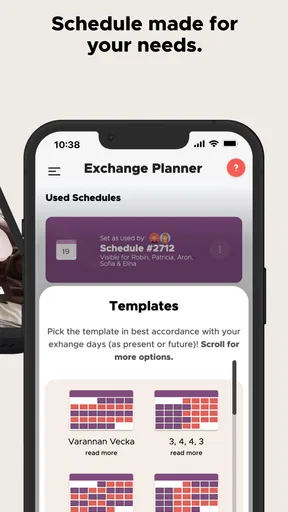
The app is designed with flexibility in mind to accommodate various family dynamics. Users can customize settings to reflect specific schedules, custody arrangements, and communication preferences. Whether it's alternating weekends or shared holidays, the app allows you to tailor its features to suit your unique co-parenting needs.
How user-friendly is the Co-parenting app for those who are not tech-savvy?
The Co-parenting app is designed to be intuitive and user-friendly, with a straightforward interface that guides users through setup and daily use. It includes tutorials and a help section to assist those who may not be technologically inclined, ensuring that all users can effectively utilize its features with ease.
What kind of customer support is available if I encounter issues with the Co-parenting app?
The app offers multiple support options, including a dedicated help center, email support, and potentially live chat. Users can access FAQs, troubleshooting guides, and contact customer service for assistance with technical issues or questions about app features, ensuring a smooth and responsive user experience.


